If you are updating the WordPress core or copying data between WordPress installations, WP Toolkit suggests creating a restore point before starting the process. If you are not satisfied with the results, you can undo the changes and restore the installation to its previous state.
Creating Full Restore Points
By default, a restore point only includes the data affected by the copy or update. However, the Plesk administrator can instruct WordPress to include all data from the target installation (files and database) in the restore point. Full restore points offer the highest chance of successful restoration, but they require more time and storage space to create compared to regular restore points.
To restore a WordPress installation using a restore point:
-
Go to WordPress and click on the card for the installation you want to restore.
-
Click on the icon
 next to "Restore Point" and then click Next.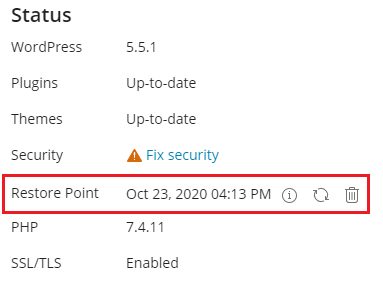
The restoration process will begin. Your installation will be restored to the state it was in before the process.
The restore point takes up storage space, which is counted towards your allowed storage quota. After restoring the WordPress installation or determining that restoration is not needed, you can remove the restore point.
To delete a restore point:
- Go to WordPress and click on the restore point you want to delete.
- Click on the icon
 next to "Restore Point" and then click Remove.
You should be aware that a restore point is not the same as a backup. If you make changes to the target instance or update it after copying data, restoration using the restore point may no longer be possible. If you are copying data or updating a WordPress installation in a production environment, you should create a backup in addition to creating a restore point.