If you clone a WordPress website, a complete copy with all the files of the website, the database, and the settings is created.
This can be helpful in the following situations:
- You have a non-public version (staging) of a WordPress website on a separate domain or subdomain, and you want to make the website publicly available on a production domain.
- You have a publicly available version (production) of a WordPress website and want to create a non-public copy (staging) of it to make changes that do not affect the production website.
- You want to create a master copy of your WordPress website with pre-configured settings, plugins, and themes, and then clone it for new client projects.
- You want to create multiple copies of a WordPress website and make different changes in each one, for example, to show a client multiple options to choose from.
Clone a WordPress website:
-
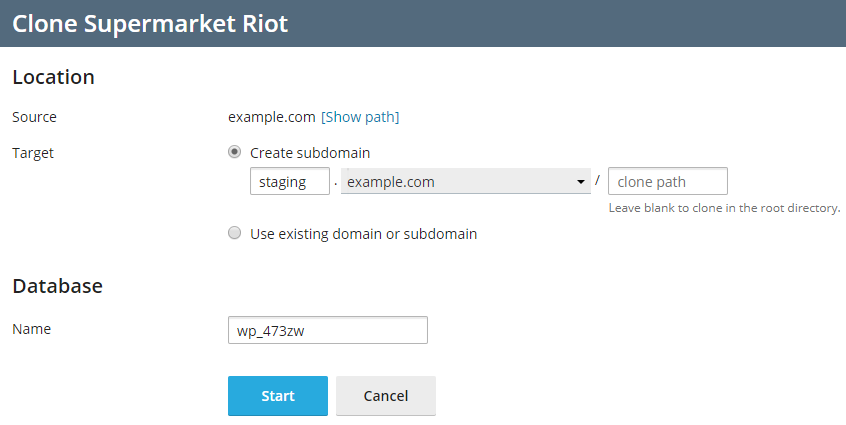
Go to WordPress and then click "Clone" on the card of the WordPress installation you want to clone.

-
Choose the destination for the cloned website:
- Leave the option "New Subdomain" selected so that WP Toolkit creates a new subdomain with the default staging prefix. You can use it or enter the desired subdomain prefix.
- Click "Use Existing Domain or Subdomain" and then select the desired domain or subdomain from the list.
Important: Make sure that the domain or subdomain selected as the destination is not already used by an existing website. Cloning may overwrite existing website data at the destination and cause data loss. - Leave the option "New Subdomain" selected so that WP Toolkit creates a new subdomain with the default staging prefix. You can use it or enter the desired subdomain prefix.
-
(Optional) Change the name of the database automatically created during cloning.
-
If you are satisfied with the selected destination and database name, click OK.
Once cloning is complete, the copy will appear in the list of WordPress installations.